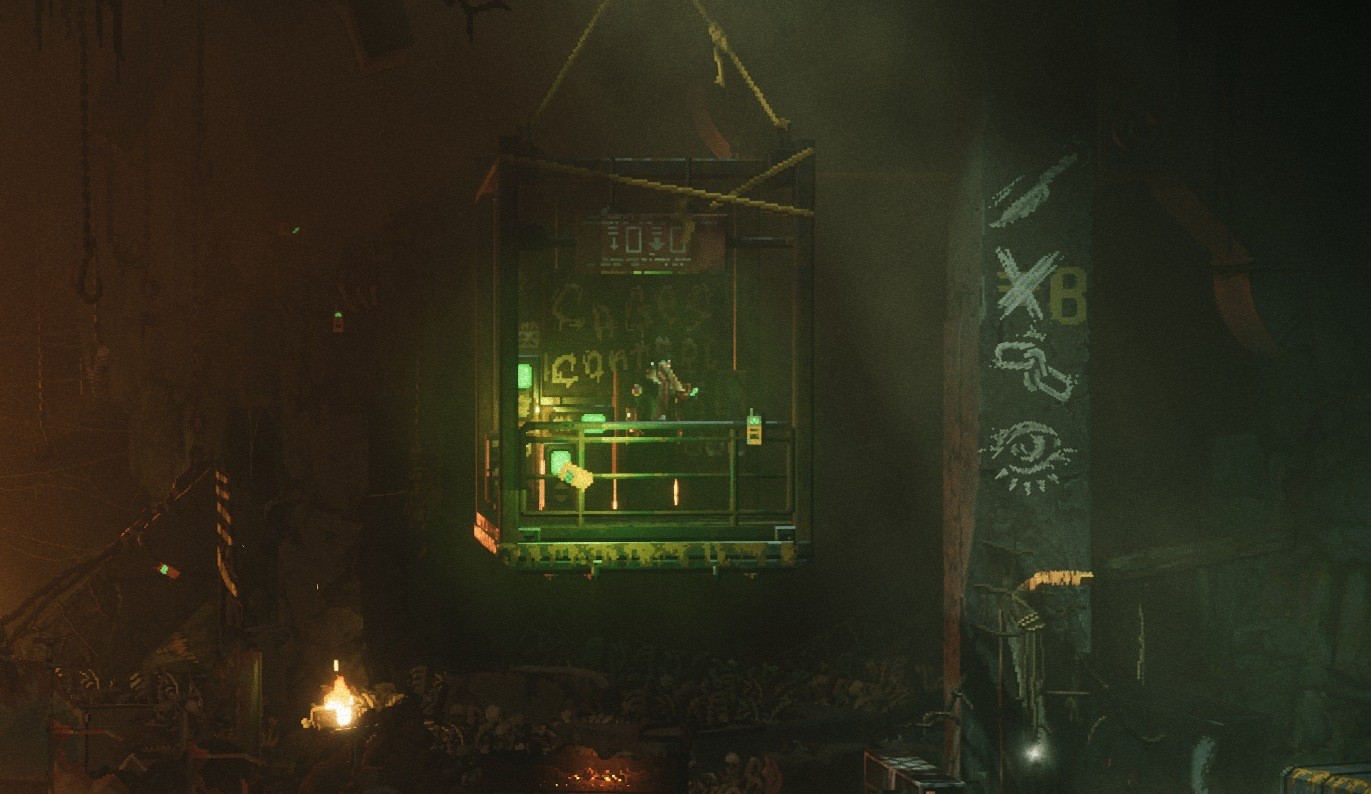
About halfway through REPLACED‘s third chapter, you’ll come across a slave who asks you to open all the nearby cages at once. But when you find the control panel to do so, you’ll discover that it’s locked behind a password. You need to enter a series of symbols in the correct order, but solving this puzzle isn’t as straightforward as you might think.
On the terminal, a message from the leader of the Termites, Bonecrusher, says the password is to the right of the device, and if you look there, you’ll find a stone column with a series of symbols in white chalk. Looking at the column, it would appear that the order of the symbols could be the password. But if you enter the symbols into the terminal the same way it appears on the column, you’ll get an error message saying the password is wrong.
This password on the slave cages control panel is a bit tricky to solve, but if you read the terminal’s original message closely, it makes a lot more sense. Here’s how to crack the code and open up the slave cages in REPLACED.
What is the password to open the slave cages?
The “CADB” in the terminal’s message is key here. It might’ve seemed like a random typo at first—and I wouldn’t blame anyone for thinking that considering how atrocious Bonecrusher’s grammar is. In actuality, though, each symbol on the column to the right of the computer corresponds to a letter in the alphabet, as indicated by the giant “B” next to the cross. That means the top symbol, the knife, is “A,” and it works its way down to the eye, which would be “D.”
So if the password is in the order of C, A, D, and B, then the correct order of symbols is as follows:
- Chains
- Knife
- Eye
- Cross
Once you pick the answers in the right sequence, you’ll get a message on the computer saying the operation is being completed and wishing you a good day. Next, you need to exit the device, then head to the right to return to the slave leader. Upon doing so, you’ll get a cutscene where all the freed slaves thank you for helping them and promise to take out the rest of the Termites if you lead them to the end of the tunnel.
The post How to open the slave cages in REPLACED appeared first on Destructoid.
Windrose‘s map might appear pretty small at first, but it expands quickly once you explore new areas. After a certain point, traveling from one point to another will take a lot of time, whether you travel the distance on land or by ship.
Thankfully, there’s a pretty elaborate fast travel system that’s been added from the demo to the early access version.
How does fast travel work in Windrose
If you’ve played the demo of Windrose, you’ll be pretty well aware of the system in place. If you’re someone completely new, read on. Once you’ve completed the first quest and started How My Shore Adventure Began (can’t miss as it’s part of the main story), you’ll be able to smelt your first copper ingot.
Once you know how to get Copper Ingot, you’ll be able to make a Fast Travel Bell using the Workbench. You’ll need 10 Copper Ingots and three Ropes to create a bell. Incidentally, you can also get Fast Travel Bell as random loot.
To set up a network, you’ll also need to create a Fast Travel Point. You can do that from the build menu. To create a Fast Travel Point, you’ll need 20 Wood and one Fast Travel Bell.
Before you can fast travel, you’ll need at least two points in two different locations. You can create two points on the same island, but they have to be distant from one another. Fast Travel Points can only be placed near water.
When you’re on your ship, you can fast travel from any location by selecting the point. This works as long as you’re not being chased by an enemy or in active combat. If you’re walking on foot, you’ll have to travel to a Fast Travel Point manually. I am unsure as to why the system works like this, but it is what it is.
Additionally, you can also find random Fast Travel Points existing in several locations. The different faction islands also have them, and you can use those after activating them by manually traveling to those locations. Once done, those travel points will be automatically added to your network.
The post How to fast travel in Windrose appeared first on Destructoid.
Recommended Story For You :
Think of it as a GPS system for World of Warcraft

FIFA 2023 ULTIMATE TEAM MILLIONS MADE EASY
Joana's Clssic WotLK 1-80 & Era 1-60 Speed Leveling Guides

Empowering Gamers with the Ultimate Secret Gold Guide
A Practical Guide For Tactical Gaming

Terra Game - Where Adventure Awaits!