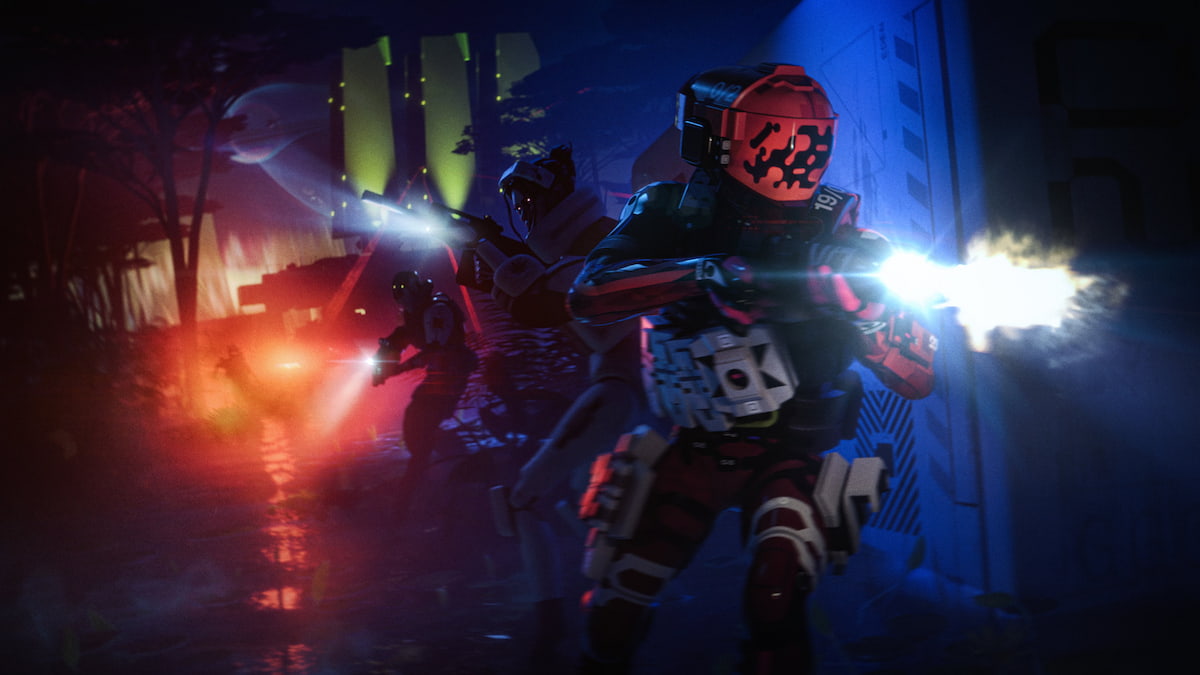
Bungie’s extraction shooter Marathon is a good but extremely niche game, so while its review scores are high, the player base is not as large as the studio nor its owner PlayStation was hoping for.
I like Marathon, but I’m worried for its future. I said as much yesterday. But after reading a new, lengthy blog post by game director Joe Ziegler today, I’m feeling a bit better about where things may be heading.
Ziegler was very open with how the game has started out and what lessons Bungie has learned so far, along with how the team is going to iterate changes while “embarking on a multi-season journey built around growing from the seed of this strong community.”
This means making the game “less grindy, more rewarding,” improving the UI/UX and matchmaking, “smoothing out onboarding” for new players, and more. And that’s without getting into actual content like maps and playable characters. But first, Ziegler says Bungie has realized the game is overwhelming to learn, first and foremost, and that needs to change.
“Marathon for new players can be an overwhelming experience,” Ziegler said. “After a short tutorial, you’re often thrown into the fire to learn a lot of concepts, navigate a lot of screens, filter through a ton of loot, and build muscle memory with a lot of mechanics fairly quickly in a hostile environment where other players can bring you down and take your stuff.”
In the immediate future, season two of Marathon will add a night-time version of the Dire Marsh map, the new Sentinel Runner Shell, weapons, and other improvements. The biggest one may be an experimental “PVE-only mode that’s focused on crews being tasked with completing objectives together and making some progress across matches,” bringing about a big change many players have been asking for.
But Ziegler teased even more what to expect beyond season two, including:
- Season 3: “A lot of revisions to our early experience, including big updates to Perimeter, alongside a new Runner shell, and additional (no spoilers) content.”
- Season 4: “We’re focusing on building more depth into the existing extraction loop.”
- Season 5: “We’re looking at bringing the whole ecosystem of (PV(P)VE) play together and evolving our weird sci-fi world in new ways.”
“For those of you who have joined us on this journey, we want to thank you,” Ziegler said in closing. “Your feedback, your endless support, and your passion have become the echoing chant that fuels us to conjure new ideas, create new solutions to problems, and have fun doing it. We’re excited for you to join us as we grow this game around you and the community you’ve created. For those of you who may be on the fence about whether or not we’re the right game for you: thank you as well. We’re excited to welcome you when you’re ready to take the dive so keep checking back in with us as we walk this journey and if you get the itch, we’ll be more than happy to have you.”
The full-length, massive post is worth reading if you’re into the game or interested in maybe picking it up after some updates, so check it out on the Bungie website ahead of Marathon’s season two coming in a few weeks on June 2.
The post Bungie’s plans for growing Marathon’s ‘strong core community,’ including a PvE-only mode, sound like just what the game needs appeared first on Destructoid.
There are two types of survival game players in the world: those who enjoy the thrill of survival in harsh environments and taking on enemies, and those who relax while building massive bases. Subnautica 2 is no exception, especially with its base-building mechanics changing from the first game.
Table of contents
How to build a base in Subnautica 2
Before you can begin making your first base in Subnautica 2, you’ll need to unlock and craft a Habitat Builder tool. Using this tool, you can access a build menu containing corridors, doors, production machines such as a Fabricator, and miscellaneous decorative items.
Subnautica 2 also offers a small tutorial in the form of a NOA entry within a nearby structure. By traveling 80 meters southeast of the Lifepod, you’ll find a Welcome Center building that’s run out of power. Inserting a basic battery into the Welcome Center’s wall panel will power its Bio Lab and NOA, who’ll give you a rundown of how base building works.
How to unlock the Habitat Builder tool
Unlocking and crafting the Habitat Builder tools requires making a Survival Multitool and Scanner. You can craft the multitool using three titanium, while the scanner uses the following resources:
- Titanium (2)
- Quartz (2)
- Basic Battery (1)
Titanium is the easiest of the required resources to find, as it’s an abundant material you’ll find around your Lifepod. Glass requires two quartz, which you’ll also quickly acquire early on. Basic batteries are slightly trickier, as you’ll need to collect copper from nearby caves.
Your next step after making these tools is to search for two old Habitat Builder tools that you can scan. Here’s a breakdown of two possible locations:
- Head back to the Welcome Center. Next to the “Welcome Center” sign outside of its entrance is a metal box containing a Habitat Builder tool.
- Go inside the building. Dive into the hole in the center of the building’s floor to find the second Habitat Builder tool inside a metal storage container next to the Oxygen Tunic.
Once you have both blueprint components, you’ll unlock the Habitat Builder tool in your Fabricator. You can craft it using the following resources:
- Titanium (2)
- Glass (1)
- Basic Battery (1)
- Copper Wire (1)
Titanium is the easiest of the required resources to find, as it’s an abundant material you’ll find around your Lifepod. Glass requires two quartz, which you’ll also quickly acquire early on. Basic batteries and copper wires are trickier, as you’ll need to collect copper from nearby caves and use your Multitool to break Acid Raion for their pouches.
All base building and furniture blueprints in Subnautica 2
Once you build the Habitat Builder tool, you can access your build menu by holding the tool in your hotbar and pressing the Open Menu key (right-click on PC.) As you collect more resources and scan furniture you encounter around the map.
Here’s a complete list of every base-building component and furniture items you can build in Subnautica 2:
Base Pieces
| Recipe | Ingredients |
|---|---|
| Corridor | Titanium (2) |
| Room | Titanium (5) |
| Hatch | Titanium (1) Quartz (1) |
| Window | Glass (1) |
| Nook | Titanium (3) Glass (2) |
| Half Round Room | Titanium (5) Glass (5) |
| Moonpool | Titanium (5) |
Furniture
| Recipe | Ingredients |
|---|---|
| Dining Chair | Titanium (2) |
| LabChair | Titanium (2) |
| Stool | Titanium (1) Rubber (1) |
| Dining Table | Titanium (3) Glass (1) |
| Single Bed | Titanium (2) Fiber (3) |
| S Shelf | Titanium (2) |
| Trashcan | Titanium (2) |
| Small Crate | Titanium (1) |
| Sign | Titanium (1) Copper (1) |
| Reaper Leviathan | Titanium (1) |
Plantables
| Recipe | Ingredients |
|---|---|
| Pent | Pent (1) |
| Macaron Sponge | Fibrous Pulp (3) |
| Mimic Pylon | Fibrous Pulp (5) Copper (4) |
| Freesia Flower | Fibrous Pulp (3) |
| Acid Raion | Medical Gel Sac (1) |
| Cradle Shootroot | Lucifer Rotsac (1) |
| Necrolei Cyst | Necrolei Cyst (1) |
| Cherimoya Rotsac | Cherimoya Rotsac (1) |
Power
| Recipe | Ingredients |
|---|---|
| Solar Panel | Titanium (1) Quartz (2) |
| Hydroelectric Turbine | Titanium (3) Copper (3) Silver (3) |
| Thermal Plant | Titanium (3) Copper (3) Gold (3) |
| Power Transmitter | Titanium (1) Copper (1) |
Production
| Recipe | Ingredients |
|---|---|
| Fabricator | Titanium (1) Copper (1) Quartz (1) |
| Processor | Titanium (2) Mild Acid (1) Copper Wire (1) |
| Biolab | Titanium (3) Copper Wire (1) Mild Acid (1) |
| Modification Station | Titanium (2) Celestine (2) Copper (2) |
Divisional
| Recipe | Ingredients |
|---|---|
| Interior Wall | Titanium (2) |
| Interior Arch | Titanium (1) |
| Interior Door | Titanium (3) Glass (1) Copper Wire (1) |
| Ladder | Titanium (2) |
Lighting
| Recipe | Ingredients |
|---|---|
| Exterior Wall Light | Titanium (1) Copper (1) |
| Spotlight | Titanium (1) Copper (2) |
Storage
| Recipe | Ingredients |
|---|---|
| Wall Locker | Titanium (2) |
| Floor Locker | Titanium (3) Quartz (1) |
| Tailing Chest | Titanium (3) |
| Wall Rack | Titanium (1) Copper (1) |
Tailing Furniture
| Recipe | Ingredients |
|---|---|
| Tailing Table | Titanium (2) |
| Tailing Drum | Titanium (2) Fiber Mesh (2) |
| Tailing Barrel | Titanium (2) |
| Coral Jar | Coral Shavings (2) |
| Small Coral Jar | Coral Shavings (1) |
| Tailing Jar | Fiber (1) Salt (1) |
| Hanging Tailing Jar | Fiber (2) Salt (1) |
| Tailing Rug | Fiber (3) |
Axum Furniture
| Recipe | Ingredients |
|---|---|
| Small Axum Jar | Glass (1) Copper (1) |
| Axum Jar | Glass (1) Copper (2) |
| Tall Axum Jar | Glass (1) Copper (3) |
Utility
| Recipe | Ingredients |
|---|---|
| Habitat Beacon | Titanium (1) |
Lighting
| Recipe | Ingredients |
|---|---|
| Small Ceiling Light | Titanium (1) Copper (1) |
| Rectangular Ceiling Light | Titanium (2) Copper (1) |
| Wall Light Small | Titanium (1) Copper (1) |
| Wall Light Large | Titanium (2) Copper (1) |
| Axum Wall Lamp | Celestine (1) Titanium (1) |
Posters
| Recipe | Ingredients |
|---|---|
| Keep Calm Poster | Titanium (1) |
| Just Keep Swimming Poster | Titanium (1) |
| Safety First Poster | Titanium (1) |
| Scout Ray Poster | Titanium (1) |
| Zezura Poster | Titanium (1) |
| New Life Poster | Titanium (1) |
| Painted Tree Poster | Titanium (1) |
| Pioneer Program Poster | Titanium (1) |
| CHBC Live Poster | Titanium (1) |
| Lost River Poster | Titanium (1) |
Power
| Recipe | Ingredients |
|---|---|
| Battery Terminal | Titanium (2) Quartz (2) Copper Wire (1) |
| Power Cell Terminal | Titanium (3) Copper (3) Wiring Kit (1) |
| Bioreactor | Titanium Ingot (2) Copper Ingot (2) |
| Power Storage | Germanium Ingot (1) Titanium (3) Salt (2) |
Decorations
| Recipe | Ingredients |
|---|---|
| Wall Unit Small | Titanium (1) |
| Wall Panel | Titanium (1) |
| Wall Unit Large | Titanium (3) |
| Wall Vent | Titanium (2) |
| Wall Vent Large | Titanium (3) |
Habitat Systems
| Recipe | Ingredients |
|---|---|
| Biobed | Titanium (3) Glass (1) Copper Wire (1) |
| NOA Terminal | Titanium (3) Glass (1) Copper Wire (1) |
| Scanner Station | Titanium (3) System Chip (1) Wiring Kit (1) |
| Time of Day Display | Titanium (1) Copper (1) Enameled Glass (1) |
Utility
| Recipe | Ingredients |
|---|---|
| Portable Locker | Titanium (4) |
| Beacon | Copper (1) Titanium (1) |
| Portable Oxygen Generator | Titanium (3) Lithium (2) |
| Work Light | Titanium (3) Quartz (2) |
| Dive Elevator | Titanium (4) Copper (2) Quartz (2) |
Exterior Decorations
| Recipe | Ingredients |
|---|---|
| Roof Pmp | Titanium (1) |
| Roof Pump Double | Titanium (2) |
| Roof Cylinder | Titanium (1) |
| Roof Panel Large | Titanium (2) |
| Roof Antenna | Titanium (1) |
| Roof Antenna Large | Titanium (3) |
| Roof Listening Dish | Titanium (3) |
If you’d like to learn more about the game’s crafting recipes, check out our complete Subnautica 2 blueprint list, or click the tags below to explore our growing guide collection.
The post How to unlock base building in Subnautica 2 appeared first on Destructoid.
Recommended Story For You :

Think of it as a GPS system for World of Warcraft

FIFA 2023 ULTIMATE TEAM MILLIONS MADE EASY

Joana's Clssic WotLK 1-80 & Era 1-60 Speed Leveling Guides

Empowering Gamers with the Ultimate Secret Gold Guide

A Practical Guide For Tactical Gaming

Terra Game - Where Adventure Awaits!