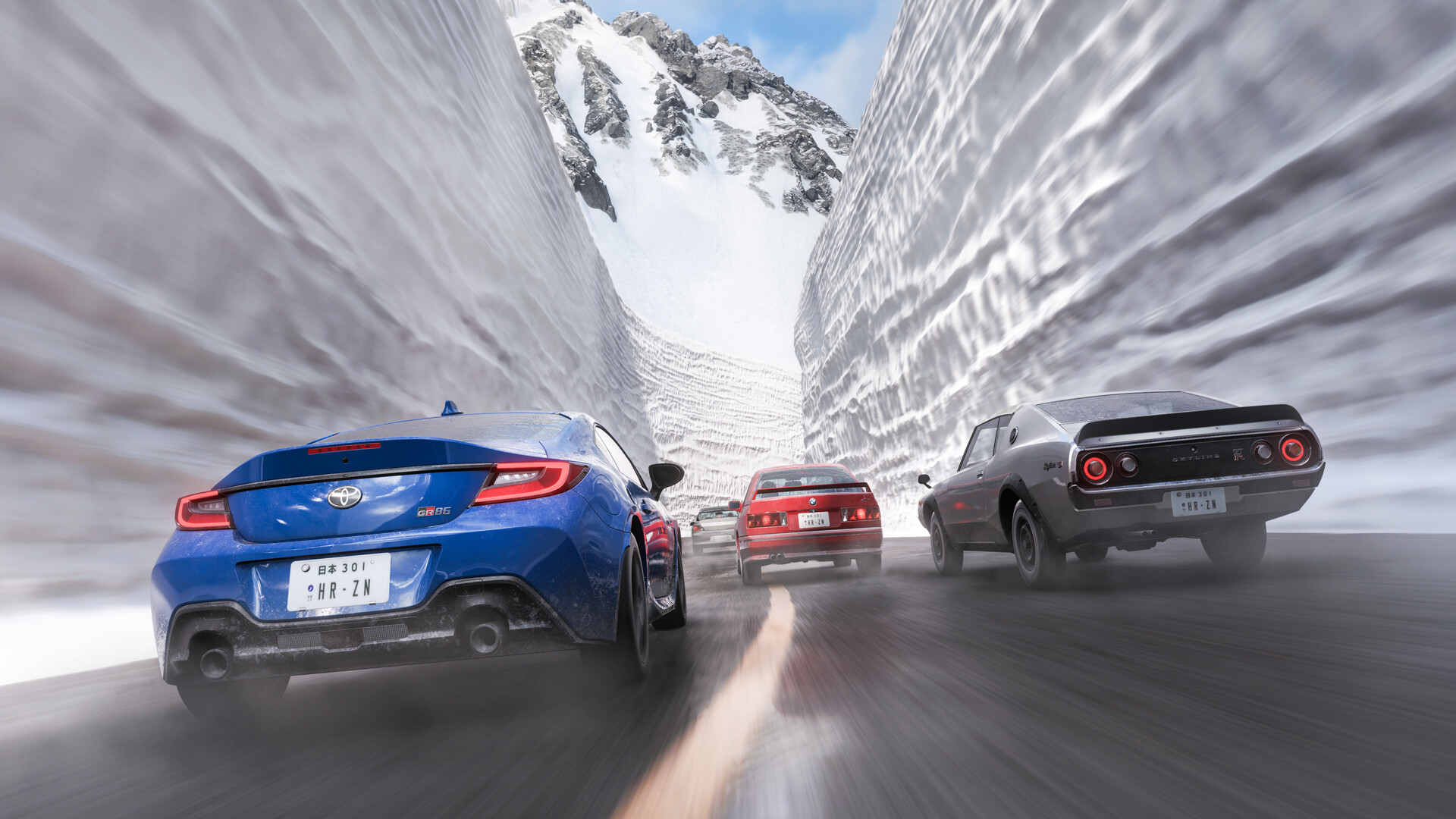
It’s been five long years, and Forza Horizon 6 is here to take us to the other side of the Pacific. The action now pivots from the dusty roads of Mexico to the streets of Japan and Mt. Fuji.
I have been stoked ever since the teaser was released last year, and I finally got to play. Here’s what I found.
Forza Horizon 6 does Japan’s beauty justice
Forza Horizon 6 showcases how the series has evolved in both gameplay and visuals. The picturesque landscapes flying by when you’re cruising in your car are breathtaking. The way Playground Games has managed to translate the beauty of Japan into a video game is truly worth praise.
The gameplay is equally rewarding. A game with so many cars can end up feeling repetitive, where vehicles are nothing but highly detailed clones. In Horizon 6, no two cars look, feel, or move the same. Combined with the revamped Horizon Festival, there’s a lot of immersion and reward behind every in-game activity.
Slow, satisfying progression makes it feel earned
Forza Horizon 5 felt more like a sandbox than anything else, with so much to do and so many cars attainable from the get-go. With Forza Horizon 6, Playground Games has adopted a more structured approach.
You’re no longer the superstar you were back in FH5. Instead, you’re a tourist who has arrived to enjoy a music festival. How you spiral into the world of races and hypercars is something I leave for you to figure out. However, you no longer have an array of Ferraris jumping straight from an aircraft. The scale of operations has been toned down quite a bit, and at its core are the wristbands from the first two games.
Every race rewards you with Horizon Festival points, which unlock the main events. Participating and winning the races allows you to unlock more events, and the series continues. You’ll unlock plenty of customization items, new cars, and more with the wristbands you collect. While you can participate in the festival at your own pace, you can’t just bypass it like in FH5.
The slower progression can feel like a slog at first, but there’s also something satisfying about working your way up from the bottom in classic style.
The wristbands also lock you to specific tiers of events and races. You gradually move up as you get more by winning different events. This prevents us from jumping haphazardly across different difficulty events, some of which can prove to be extremely challenging.
There’s a dedicated endgame system as well, but the pre-launch version doesn’t shed much light on this. However, there is plenty of additional content to clear aside from the Horizon Festival. This includes multiplayer events, Horizon Rush races, and an experimental track-creation system that lets you create whatever you want.
Cars, cars, and more cars
FH6 has over 550 cars (yes, insane) in the base version of the game. A lot of them will be locked until you earn the necessary credits, but the Wheelspin and Super Wheelspins will allow you to get more credits and cars. The game’s collection system rewards you with even more cars. In short, you’ll never run out of vehicles.
There is also a variety of cars in every category, so whether you want to go off-road or take on the streets of Japan, you’re spoiled for choice. You’ll be overwhelmed with everything on offer by the time you reach the mid-game, which is kind of awesome.
There’s the Aftermarket for those who are still unsatisfied. Here, you’ll come across pre-owned vehicles at specific locations available at a discount. These specially-tuned vehicles add to the prestige of your collection. The beloved Auction House is also available if you want to save some credits on your next big purchase. If you opt for either the Digital Deluxe or the Premium Edition, the options only expand.
Digital Mt. Fuji has never been more beautiful
FH6 is a big technical step up from what came before, and it shows. I have been playing on PC, and it looks stunning even at low to medium settings. If your hardware is capable enough, you can turn things up a notch by enabling Ray Tracing.
Ray Tracing takes the lighting and shadows to another level. Some of the street maps at night are simply stunning, and the performance is also pretty consistent. While I have experienced minor stutters (noted as a pre-launch version issue), I solved these by making a few tweaks.
I love how Playground Games has kept accessibility in mind while making Japan look as visually stunning as possible. It just makes it easier for everyone to enjoy a beautiful racing game without having to own overly expensive hardware. I expect a few post-launch patches to smooth out the rare stutters I encountered, which would be icing on the cake.
Customize and show off
So we have races to run, cars to unlock, and Japan to explore. But what’s that worth if you can’t show it all off? You can unlock and purchase houses all over Japan to open up new regions. Once unlocked, you can show off your cars and visit different parks.
But there’s more, as for the first time, we can have our very own Estate. This is a massive piece of land that we can develop however we want. Place buildings, build facilities, and more; think of it like a city builder on the side if you’re tired of all the races.
As if owning a vast array of cars isn’t enough, you also get to customize them. This is another area where FH6 has improved. The customization options have increased. While things in this department could have been better, I love having more choices here.
The number of paint options, vinyl designs, and stickers has all increased, which allows you to create some unique designs. You can also use community creations, of which there are some amazing options already.
I wish that there were more real-world brands, though, which I’ve always felt adds to my immersion. Mods will inevitably come to the rescue for those of us on PC, so we have that to look forward to. Still, you can let your imagination run free with the sheer number of options in the base game (off-brand as many may be).
Forza Horizon 6 puts pedal to the metal
We now come to one of the most important parts of this review: how does it feel to actually drive? It’s a racing game, after all.
I have played with both the trusted DualSense controller and the Logitech G29 racing wheel. A good old controller works just fine. There are plenty of assists that the game provides if you want things to be easier, if you don’t have a wheel. However, you can also opt for a simulation experience and stop all assists for better rewards.
FH6 isn’t a sim, and it doesn’t attempt to be, either. However, driving with a wheel feels delightful, as opposed to FH4, which was far from optimized for the wheel. This largely has to do with how receptive the feedback is. Every car and track feels different, and you can tweak the in-game settings to increase or reduce the realism.
There’s also native wheel support for mainstream products. You can further change the in-game settings to personalize your drive. Whether you’re racing or just cruising the suburbs of Tokyo, every session felt enjoyable. If your wheel supports features like Forced Feedback and True Force, you can exploit those benefits to make your driving sessions even more immersive.
Forza Horizon 6 could be the start of something bigger and better
Forza Horizon 6, in many ways, feels like a rejig for the franchise with its return to wristbands. We go back to the very roots of the series, which saw us start as a greenhorn and reach the top. While we get to do so once again in the new chapter, there’s more to it.
With over 500 cars already available for us, things can only get bigger once the live service side kicks in. Playground Games has already assured that there will be a change to how the festivals have worked in the past. I am extremely excited to see just how big our garages and car collection will eventually be in the future.
With better feedback and less lag with a wheel, I have loved driving around Japan. The races feel electric, the free roam feels enigmatic, and there’s always some secret or treasure you can find during your free roam.
Some of the other elements, like the multiplayer races, will be tested once the game is out and the servers are filled. The same also applies to the future Festivals that we don’t know about yet. However, FH6 starts off in a really good place and should only get better from here.
The post Forza Horizon 6 Review – a picturesque cruise you wish wouldn’t end appeared first on Destructoid.
There are two types of survival game players in the world: those who enjoy the thrill of survival in harsh environments and taking on enemies, and those who relax while building massive bases. Subnautica 2 is no exception, especially with its base-building mechanics changing from the first game.
Table of contents
How to build a base in Subnautica 2
Before you can begin making your first base in Subnautica 2, you’ll need to unlock and craft a Habitat Builder tool. Using this tool, you can access a build menu containing corridors, doors, production machines such as a Fabricator, and miscellaneous decorative items.
Subnautica 2 also offers a small tutorial in the form of a NOA entry within a nearby structure. By traveling 80 meters southeast of the Lifepod, you’ll find a Welcome Center building that’s run out of power. Inserting a basic battery into the Welcome Center’s wall panel will power its Bio Lab and NOA, who’ll give you a rundown of how base building works.
How to unlock the Habitat Builder tool
Unlocking and crafting the Habitat Builder tools requires making a Survival Multitool and Scanner. You can craft the multitool using three titanium, while the scanner uses the following resources:
- Titanium (2)
- Quartz (2)
- Basic Battery (1)
Titanium is the easiest of the required resources to find, as it’s an abundant material you’ll find around your Lifepod. Glass requires two quartz, which you’ll also quickly acquire early on. Basic batteries are slightly trickier, as you’ll need to collect copper from nearby caves.
Your next step after making these tools is to search for two old Habitat Builder tools that you can scan. Here’s a breakdown of two possible locations:
- Head back to the Welcome Center. Next to the “Welcome Center” sign outside of its entrance is a metal box containing a Habitat Builder tool.
- Go inside the building. Dive into the hole in the center of the building’s floor to find the second Habitat Builder tool inside a metal storage container next to the Oxygen Tunic.
Once you have both blueprint components, you’ll unlock the Habitat Builder tool in your Fabricator. You can craft it using the following resources:
- Titanium (2)
- Glass (1)
- Basic Battery (1)
- Copper Wire (1)
Titanium is the easiest of the required resources to find, as it’s an abundant material you’ll find around your Lifepod. Glass requires two quartz, which you’ll also quickly acquire early on. Basic batteries and copper wires are trickier, as you’ll need to collect copper from nearby caves and use your Multitool to break Acid Raion for their pouches.
All base building and furniture blueprints in Subnautica 2
Once you build the Habitat Builder tool, you can access your build menu by holding the tool in your hotbar and pressing the Open Menu key (right-click on PC.) As you collect more resources and scan furniture you encounter around the map.
Here’s a complete list of every base-building component and furniture items you can build in Subnautica 2:
Base Pieces
| Recipe | Ingredients |
|---|---|
| Corridor | Titanium (2) |
| Room | Titanium (5) |
| Hatch | Titanium (1) Quartz (1) |
| Window | Glass (1) |
| Nook | Titanium (3) Glass (2) |
| Half Round Room | Titanium (5) Glass (5) |
| Moonpool | Titanium (5) |
Furniture
| Recipe | Ingredients |
|---|---|
| Dining Chair | Titanium (2) |
| LabChair | Titanium (2) |
| Stool | Titanium (1) Rubber (1) |
| Dining Table | Titanium (3) Glass (1) |
| Single Bed | Titanium (2) Fiber (3) |
| S Shelf | Titanium (2) |
| Trashcan | Titanium (2) |
| Small Crate | Titanium (1) |
| Sign | Titanium (1) Copper (1) |
| Reaper Leviathan | Titanium (1) |
Plantables
| Recipe | Ingredients |
|---|---|
| Pent | Pent (1) |
| Macaron Sponge | Fibrous Pulp (3) |
| Mimic Pylon | Fibrous Pulp (5) Copper (4) |
| Freesia Flower | Fibrous Pulp (3) |
| Acid Raion | Medical Gel Sac (1) |
| Cradle Shootroot | Lucifer Rotsac (1) |
| Necrolei Cyst | Necrolei Cyst (1) |
| Cherimoya Rotsac | Cherimoya Rotsac (1) |
Power
| Recipe | Ingredients |
|---|---|
| Solar Panel | Titanium (1) Quartz (2) |
| Hydroelectric Turbine | Titanium (3) Copper (3) Silver (3) |
| Thermal Plant | Titanium (3) Copper (3) Gold (3) |
| Power Transmitter | Titanium (1) Copper (1) |
Production
| Recipe | Ingredients |
|---|---|
| Fabricator | Titanium (1) Copper (1) Quartz (1) |
| Processor | Titanium (2) Mild Acid (1) Copper Wire (1) |
| Biolab | Titanium (3) Copper Wire (1) Mild Acid (1) |
| Modification Station | Titanium (2) Celestine (2) Copper (2) |
Divisional
| Recipe | Ingredients |
|---|---|
| Interior Wall | Titanium (2) |
| Interior Arch | Titanium (1) |
| Interior Door | Titanium (3) Glass (1) Copper Wire (1) |
| Ladder | Titanium (2) |
Lighting
| Recipe | Ingredients |
|---|---|
| Exterior Wall Light | Titanium (1) Copper (1) |
| Spotlight | Titanium (1) Copper (2) |
Storage
| Recipe | Ingredients |
|---|---|
| Wall Locker | Titanium (2) |
| Floor Locker | Titanium (3) Quartz (1) |
| Tailing Chest | Titanium (3) |
| Wall Rack | Titanium (1) Copper (1) |
Tailing Furniture
| Recipe | Ingredients |
|---|---|
| Tailing Table | Titanium (2) |
| Tailing Drum | Titanium (2) Fiber Mesh (2) |
| Tailing Barrel | Titanium (2) |
| Coral Jar | Coral Shavings (2) |
| Small Coral Jar | Coral Shavings (1) |
| Tailing Jar | Fiber (1) Salt (1) |
| Hanging Tailing Jar | Fiber (2) Salt (1) |
| Tailing Rug | Fiber (3) |
Axum Furniture
| Recipe | Ingredients |
|---|---|
| Small Axum Jar | Glass (1) Copper (1) |
| Axum Jar | Glass (1) Copper (2) |
| Tall Axum Jar | Glass (1) Copper (3) |
Utility
| Recipe | Ingredients |
|---|---|
| Habitat Beacon | Titanium (1) |
Lighting
| Recipe | Ingredients |
|---|---|
| Small Ceiling Light | Titanium (1) Copper (1) |
| Rectangular Ceiling Light | Titanium (2) Copper (1) |
| Wall Light Small | Titanium (1) Copper (1) |
| Wall Light Large | Titanium (2) Copper (1) |
| Axum Wall Lamp | Celestine (1) Titanium (1) |
Posters
| Recipe | Ingredients |
|---|---|
| Keep Calm Poster | Titanium (1) |
| Just Keep Swimming Poster | Titanium (1) |
| Safety First Poster | Titanium (1) |
| Scout Ray Poster | Titanium (1) |
| Zezura Poster | Titanium (1) |
| New Life Poster | Titanium (1) |
| Painted Tree Poster | Titanium (1) |
| Pioneer Program Poster | Titanium (1) |
| CHBC Live Poster | Titanium (1) |
| Lost River Poster | Titanium (1) |
Power
| Recipe | Ingredients |
|---|---|
| Battery Terminal | Titanium (2) Quartz (2) Copper Wire (1) |
| Power Cell Terminal | Titanium (3) Copper (3) Wiring Kit (1) |
| Bioreactor | Titanium Ingot (2) Copper Ingot (2) |
| Power Storage | Germanium Ingot (1) Titanium (3) Salt (2) |
Decorations
| Recipe | Ingredients |
|---|---|
| Wall Unit Small | Titanium (1) |
| Wall Panel | Titanium (1) |
| Wall Unit Large | Titanium (3) |
| Wall Vent | Titanium (2) |
| Wall Vent Large | Titanium (3) |
Habitat Systems
| Recipe | Ingredients |
|---|---|
| Biobed | Titanium (3) Glass (1) Copper Wire (1) |
| NOA Terminal | Titanium (3) Glass (1) Copper Wire (1) |
| Scanner Station | Titanium (3) System Chip (1) Wiring Kit (1) |
| Time of Day Display | Titanium (1) Copper (1) Enameled Glass (1) |
Utility
| Recipe | Ingredients |
|---|---|
| Portable Locker | Titanium (4) |
| Beacon | Copper (1) Titanium (1) |
| Portable Oxygen Generator | Titanium (3) Lithium (2) |
| Work Light | Titanium (3) Quartz (2) |
| Dive Elevator | Titanium (4) Copper (2) Quartz (2) |
Exterior Decorations
| Recipe | Ingredients |
|---|---|
| Roof Pmp | Titanium (1) |
| Roof Pump Double | Titanium (2) |
| Roof Cylinder | Titanium (1) |
| Roof Panel Large | Titanium (2) |
| Roof Antenna | Titanium (1) |
| Roof Antenna Large | Titanium (3) |
| Roof Listening Dish | Titanium (3) |
If you’d like to learn more about the game’s crafting recipes, check out our complete Subnautica 2 blueprint list, or click the tags below to explore our growing guide collection.
The post How to unlock base building in Subnautica 2 appeared first on Destructoid.
Recommended Story For You :

Think of it as a GPS system for World of Warcraft

FIFA 2023 ULTIMATE TEAM MILLIONS MADE EASY

Joana's Clssic WotLK 1-80 & Era 1-60 Speed Leveling Guides

Empowering Gamers with the Ultimate Secret Gold Guide

A Practical Guide For Tactical Gaming

Terra Game - Where Adventure Awaits!